Trusted since 2008 – now rebuilt
Some programs stay with you for years. HMF Address is one of them: since 2008, families, clubs and small offices have used it to manage their contacts on their own PC. With version 3.0 we have rebuilt the address book from scratch – more modern, faster and even easier to use.
What has stayed is what has always defined HMF Address: no user account, no subscription, no mandatory cloud. Your contacts live on your computer and nowhere else.
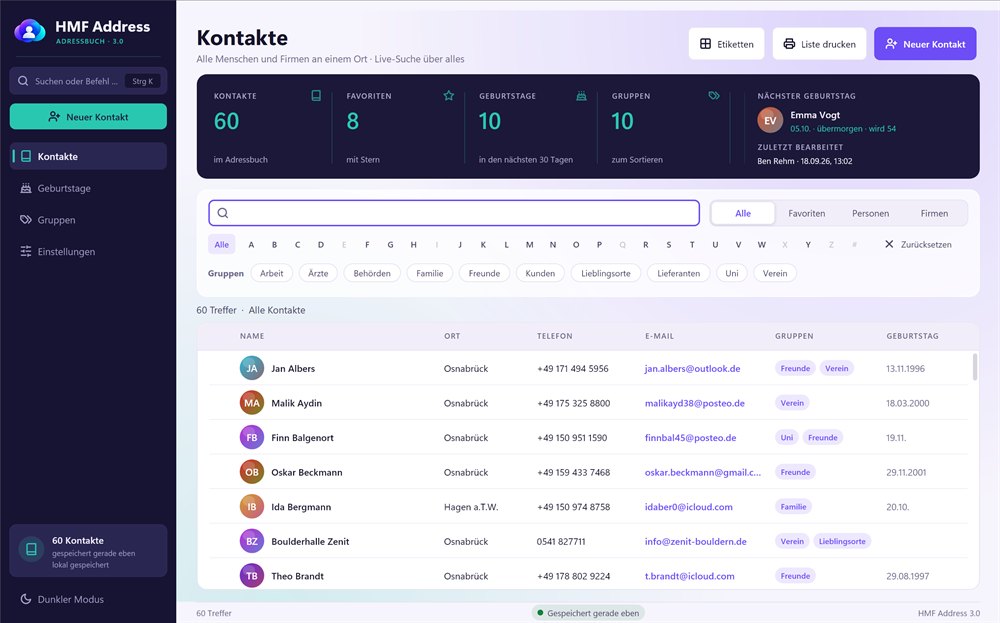
What's in version 3.0
- Search across every field: town, phone number, company, group or note – "club osnabrück" instantly shows every club member from Osnabrück.
- Birthdays at a glance: as soon as the program starts, you see who is celebrating soon and how old they will be – and you can call them straight from the list.
- Labels and lists: address labels for common label sheets, plus address, phone and birthday lists – all available as PDF too.
- QR code for your phone: point the camera at it and the contact is in your phone book – no cable, app or account needed.
- Five colour themes, light or dark, plus three font sizes and large click targets.
- For keyboard fans: Ctrl + K opens the command search.
- On the go, too: a portable version runs straight from a USB stick.
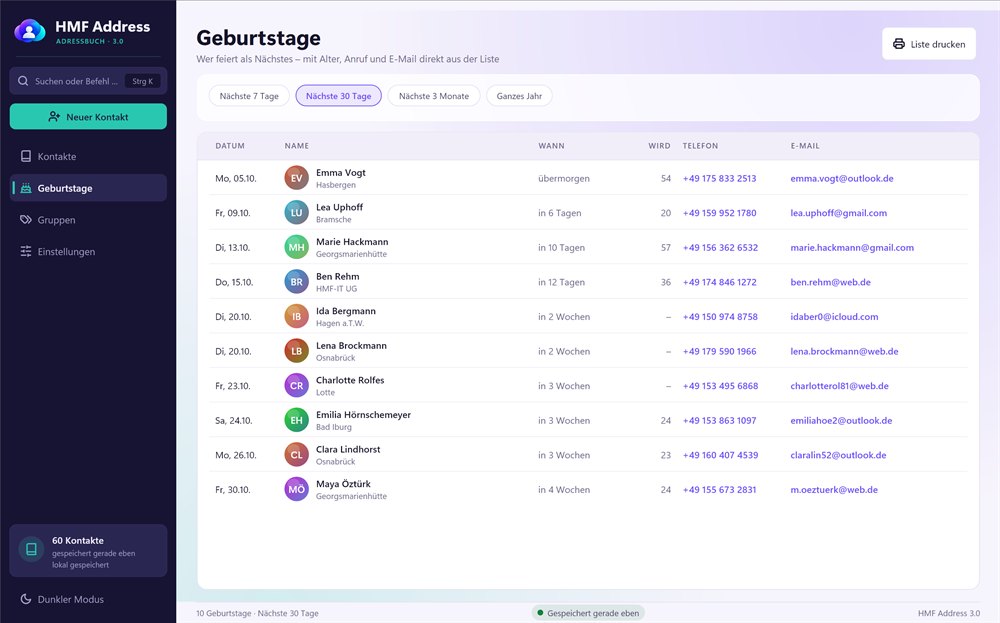
Why an address book on your own PC?
Today, many contacts drift automatically into the cloud of the big providers. That is convenient, but not everyone wants to store the addresses of family members, club members or customers there. HMF Address keeps everything in a single file in your user folder, creates a backup copy every day and lets you undo deletions.
If you use several PCs, simply put the file in your own Dropbox, OneDrive, Google Drive or kDrive folder. You stay in control.
Switching without the hassle
If you already use HMF Address 1.x, there is nothing to prepare: on first start, all your contacts are taken over automatically. From Outlook, Google Contacts, Excel or your phone, save your contacts as a CSV or vCard file and import them. HMF Address recognises the source, maps the fields correctly and finds duplicate entries.
HMF Address 3.0 runs on Windows 10 and 11. To try it out, there is a free 30-day trial version with up to 25 contacts.
Frequently asked questions
HMF Address is not a subscription: you pay once and use the program for as long as you like. All updates for version 3 are included. You will find the editions and current prices on hmf-address.de (German).
Yes. After downloading, HMF Address runs as a trial version for 30 days with up to 25 contacts. Entering the licence key turns it into the full version – without reinstalling and without losing any contacts.
They are taken over automatically the first time you start version 3.0. You don't need to export or convert anything.
Curious?
Download HMF Address 3.0 and try it free for 30 days. You will find all features, screenshots and prices on hmf-address.de (German).